

A project that has been on my backlog for sometime now is to test out the Google Colab Generative AI features and functionality. I spent a little time over the weekend tinkering with this service, and here are my impressions.
Source Data
My data source for this small project comes from Data.gov and contains average fruit prices for the years 2013, 2016, 2020, and 2022. I used the ALL FRUITS – Average prices (CSV format) dataset. This dataset is extremely small and will not be particularly useful by itself. This will not be an issue as the goal of this project is just to assess what the Colab Generative AI is capable of, not gain any real insights from the data.
Testing the Generative AI
Starting from a blank notebook, my first prompt was an easy one: “Load the data from the csv file at this location into a data frame: https://www.ers.usda.gov/webdocs/DataFiles/51035/Fruit-Prices-2022.csv?v=8579.9”. The response was this generated code:
# prompt: Load the data from the csv file at this location into a data frame: https://www.ers.usda.gov/webdocs/DataFiles/51035/Fruit-Prices-2022.csv?v=8579.9

import pandas as pd
df = pd.read_csv('https://www.ers.usda.gov/webdocs/DataFiles/51035/Fruit-Prices-2022.csv?v=8579.9')
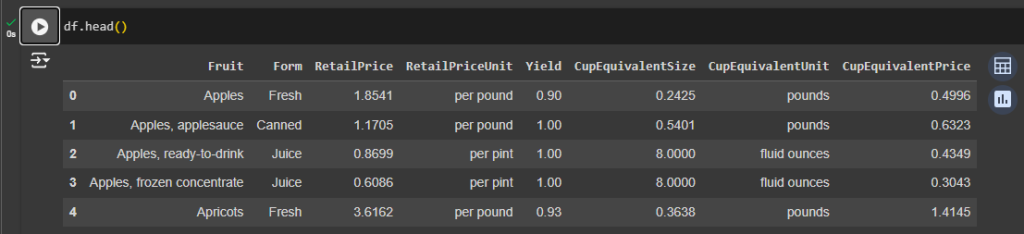
The generated code was correct and pulled the CSV file into a data frame just as I had asked it to do. A quick look at the data frame using df.head() highlighted the features that I had to work with: Fruit, Form, RetailPrice, RetailPriceUnit, Yield, CupEquivalentSize, CupEquivalentUnit, CupEquivalentPrice.
I decided to skip a few steps and give the Colab AI a prompt that probably would not work unless it had enough training to identify that I had not performed any data cleansing. Here is the next prompt followed by the code it generated:
# prompt: Perform a principal component analysis on the data in df using RetailPrice as the target.

from sklearn.preprocessing import StandardScaler
from sklearn.decomposition import PCA

# Separate features and target variable
X = df.drop('RetailPrice', axis=1)  # Assuming 'RetailPrice' is the target
y = df['RetailPrice']

# Standardize the features
scaler = StandardScaler()
X_scaled = scaler.fit_transform(X)

# Apply PCA
pca = PCA()
X_pca = pca.fit_transform(X_scaled)

# Explained variance ratio
print(pca.explained_variance_ratio_)
The results:
---------------------------------------------------------------------------
ValueError Traceback (most recent call last)
in | ()
10 # Standardize the features
11 scaler = StandardScaler()
---> 12 X_scaled = scaler.fit_transform(X)
13
14 # Apply PCA
8 frames
/usr/local/lib/python3.10/dist-packages/pandas/core/generic.py in __array__(self, dtype)
2082 def __array__(self, dtype: npt.DTypeLike | None = None) -> np.ndarray:
2083 values = self._values
-> 2084 arr = np.asarray(values, dtype=dtype)
2085 if (
2086 astype_is_view(values.dtype, arr.dtype)
ValueError: could not convert string to float: 'Apples' | As expected, it did not attempt to convert any of the features before running a PCA over the data. Another couple of prompts corrected this using LabelEncoder.
# prompt: Use sklearn LabelEncoder to encode the following features: Fruit, Form, RetailPriceUnit, and CupEquivalentUnit

from sklearn.preprocessing import LabelEncoder

le = LabelEncoder()
df['Fruit_Encoded'] = le.fit_transform(df['Fruit'])
df['Form_Encoded'] = le.fit_transform(df['Form'])
df['RetailPriceUnit_Encoded'] = le.fit_transform(df['RetailPriceUnit'])
df['CupEquivalentUnit_Encoded'] = le.fit_transform(df['CupEquivalentUnit'])

# prompt: Perform a principal component analysis on the data in df using RetailPrice as the target and the following features as input: Fruit_Encoded, Form_Encoded, RetailPriceUnit_Encoded, CupEquivalentUnit_Encoded.

from sklearn.preprocessing import StandardScaler
from sklearn.decomposition import PCA

features = ['Fruit_Encoded', 'Form_Encoded', 'RetailPriceUnit_Encoded', 'CupEquivalentUnit_Encoded']
x = df.loc[:, features].values
y = df.loc[:,['RetailPrice']].values

x = StandardScaler().fit_transform(x)

pca = PCA(n_components=2)
principalComponents = pca.fit_transform(x)
principalDf = pd.DataFrame(data = principalComponents
             , columns = ['principal component 1', 'principal component 2'])
The code executes without any problems. This is not the correct way to use PCA or LabelEncoder; I just wanted to see what kind of code Colab would generate. Let’s scrap that last section and try something that could provide some insights.
# prompt: Build a model using the data that shows which inputs result in a larger target value for RetailPrice.

from sklearn.model_selection import train_test_split
from sklearn.linear_model import LinearRegression
from sklearn.metrics import mean_squared_error

# Assuming 'RetailPrice' is the target variable and the rest are features
X = df.drop('RetailPrice', axis=1)
y = df['RetailPrice']

# Convert categorical features to numerical using one-hot encoding
X = pd.get_dummies(X)

# Split the data into training and testing sets
X_train, X_test, y_train, y_test = train_test_split(X, y, test_size=0.2, random_state=42)

# Create a linear regression model
model = LinearRegression()

# Fit the model to the training data
model.fit(X_train, y_train)

# Make predictions on the testing data
y_pred = model.predict(X_test)

# Evaluate the model
mse = mean_squared_error(y_test, y_pred)
print("Mean Squared Error:", mse)

# Get coefficients to see which features contribute most to RetailPrice
coefficients = pd.DataFrame({'Feature': X.columns, 'Coefficient': model.coef_})
print(coefficients.sort_values('Coefficient', key=abs, ascending=False))
All of that code works. I noticed a couple of interesting things:
- The generative AI missed that I provided which feature to use as the target (RetailPrice), but still “assumed” the correct feature.
- The One-hot encoding was done via Pandas instead of Scikit-learn even though Scikit-learn was used for the rest of the model.
- A simple linear regression was selected as the model to apply to the data. This was probably the best choice given the target feature, lack of inputs, and overall dataset size.
The output from the last two lines of generated code contains the Mean Squared Error and feature coefficient values in descending order:
Mean Squared Error: 3.9820839227190756
                                      Feature   Coefficient
1                           CupEquivalentSize -1.845601e+01
65                   RetailPriceUnit_per pint  1.678884e+01
64                                 Form_Juice  1.678884e+01
67             CupEquivalentUnit_fluid ounces  1.678884e+01
66                  RetailPriceUnit_per pound -1.678884e+01
..                                        ...           ...
34                                 Fruit_Kiwi  6.938894e-17
56          Fruit_Pomegranate, ready-to-drink  0.000000e+00
50  Fruit_Pineapple, packed in syrup or water  0.000000e+00
49           Fruit_Pineapple, packed in juice  0.000000e+00
51            Fruit_Pineapple, ready-to-drink  0.000000e+00

[69 rows x 2 columns]
Some of the results are expected, such as the CupEquivalentSize and RetailPriceUnit affecting the RetailPrice. Line three of the output begins to provide some meaningful insights. Given the limited data provided to the model, it shows that fruit in the form of juice affects the RetailPrice more than the other forms. Not too bad considering that the only code that I have manually written was to view the data frames or variables that Colab generated.
I decided to move away from prompts about modeling the data and instead just started asking some general questions. I’ve omitted the generated code here for brevity, but the full notebook is available for viewing at the end of this article.
Prompt: Which Fruit value has the hightest RetailPrice per pound?
Response: The fruit with the highest average RetailPrice per pound is Figs at $7.32
When evaluating this prompt Colab did not use the “per pound” value in the RetailPriceUnit feature. A little tweaking of the prompt corrected this.
Prompt: Which Fruit value has the hightest RetailPrice where RetailPriceUnit = “per pound”?
Response: The fruit with the highest ‘RetailPrice’ per pound is: Mangoes
Interestingly enough, the code that was generated for these last two prompts was completely different. In the first prompt Colab calculated the mean of the RetailPrice values while grouping by the Fruit feature, then selected the highest price based on the mean values. In the second prompt, Colab started by limiting the data to only the “per pound” records, then simply picked the highest priced Fruit from those records.
The next prompt worked well and is a great example of how non-technical users can use generative AI to gain insights into their data.
Prompt: On average do RetailPriceUnit values of “per pound” or “per pint” have a higher RetailPrice?
RetailPriceUnit
per pint     1.199436
per pound    3.381757
Name: RetailPrice, dtype: float64
On average, 'per pound' has a higher RetailPrice.
Final Thoughts
This micro-project was just a test, something for me to play with early on a Saturday morning. I was not trying to dig deep into pricing data around fruit sales, but simply seeing what kind of results could be achieved using Google Colab Generative AI code to work on the data. I intentionally kept my manually typed code to a minimum to see how feasible it would be for someone to use prompts and generated code only to gain insights from a dataset.
Overall, I believe that the Colab AI will be able to get data science “newcomers” into working with their data very quickly. The key part of this will be testing out which prompts work best for the task they are trying to complete. For those who use Python on a regular basis, it will not replace your manually created code, but rather streamline some of the tediousness of importing modules and setting up variables.
The full notebook that I created for this small project is available here.